
How do I post photos on the site?
There are a few different ways:
If you have the images hosted elsewhere, like Photobucket or Flickr...
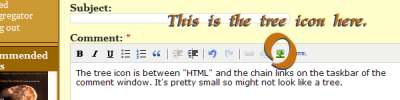
- Click on the little tree icon and paste in the image URL. That should work.
- If you have the BBTag markup to the image location, just paste it into the editor.
- If you have raw HTML to the image location, click the little "HTML" button on the far right, paste in the HTML, and save.
- See also Debra Wink's comment here.
Detailed instructions for posting from Flickr:
- Paste your message into TFL
- move the cursor to the place you want the image.
- In another window, go to Flickr and find the image you want.
- Click the "All Sizes" link and find the size you want to embed.
- Copy the Image URL from below the photo, below the "2. Grab the photo's URL:" text.
- Go back to the window with TFL. Click the tree icon (shown in the FAQ). A little window will pop up.
- Paste the image URL into the "Image URL" field and click the "Insert" button.
- Repeat with the rest of your images.
If the images are on your hard drive and you don't have a place to host them...
Click on the little tree icon. Then click on the little box with folders in it at the right side of the Image URL box. This will let you store the photo on Fresh Loaf's server. Select the image to include it.
What size and format should the images be?
Preferably no wider than 800 pixels, and gif, jpeg, or png files are the preferred formats.
There are many good free photo resizing and touch up tools, such as PicSizer or Picasa. Mac users should already have iPhoto, and most Linux distros come with GIMP.